

That Moment When You Realize You’re Locked Out
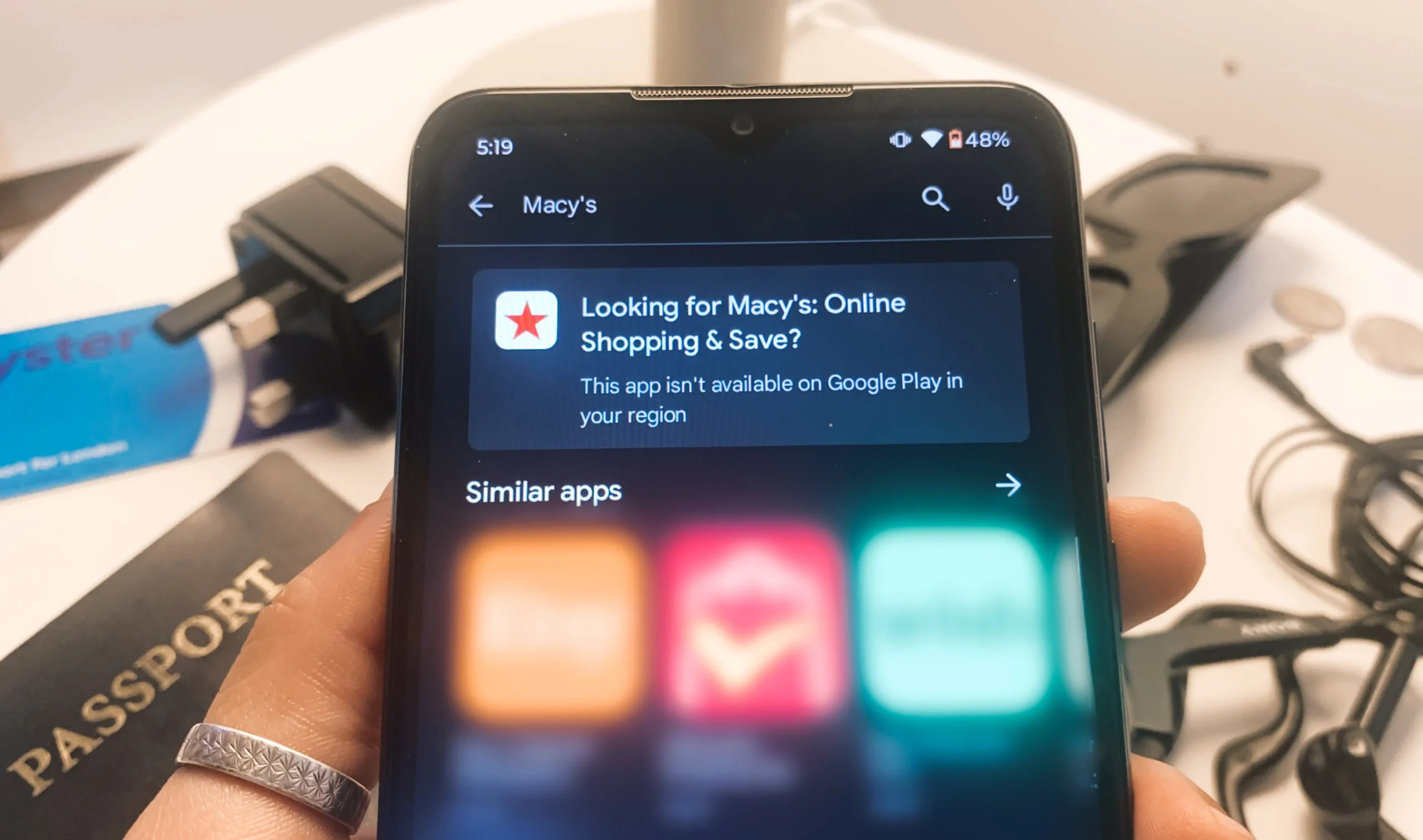
As a frequent traveler, I’ve learned that digital walls can be just as frustrating as physical ones. Last month, Macy’s had a big sale, and I wanted to send some perfume to a friend for her birthday. She’s in the U.S., and I’m currently living abroad. While browsing the site, I noticed an extra 15% off if you used the app to place your order. Even better. But when I tried to download the app, I hit an invisible digital fence: “This app isn’t available in your region.” That message reminded me of a workaround I hadn’t used in a while—installing APKs while traveling.
Geo-restrictions determine whether your favorite app even appears in the app store. These digital speed bumps can slow you down, but they don’t have to stop you. For travelers, expats, or anyone living outside their home country, installing APKs while abroad is still one of the most effective workarounds.

What is an APK?
An APK, or Android Package Kit, is the file format used to install apps on Android devices. It contains all the components an app needs to run properly. When you download an app from the Google Play Store, you’re automatically downloading its APK. However, when you get an APK from a third-party site, you’re manually installing it yourself.
APKs offer a workaround to certain restrictions by letting you bypass the Play Store. This process, known as sideloading, allows you to install apps that might not be available in your country or have been removed from the Play Store entirely. It’s a great tool for travelers facing geo-blocks or other app availability issues.

It’s important to note that APKs are designed specifically for Android devices. There are different APK variants that are compatible with specific versions. So, if you’re using an iPhone, you won’t be able to use APKs directly, as iOS doesn’t support them. The workarounds on iOS are more complex and generally not recommended for most users.
If you’ve been trying unsuccessfully to use a VPN to access a restricted app, installing an APK could be the next best option. Depending on how urgently you need the app and how long you’ll be in a region where it’s unavailable, you’ll have to decide if you’re ready to dive into a slightly more technical process.
Why You Might Need to Use APKs While Traveling
Using an APK abroad is most helpful when you’re facing these types of restrictions:
Geo-restrictions: Some apps, like Macy’s, are only available in specific regions. For example, social media or rideshare apps might disappear from the Play Store once you cross a border.
Device compatibility: The Play Store may tell you that an app isn’t compatible with your device, even though it actually works just fine.
App updates or downgrades: Sometimes, upgrading an app can bring confusing new features or unresolved bugs. If you’ve regretted an update, installing an older version of the app can bring back the features you preferred.
Censorship: In some countries, certain apps are completely blocked, which can limit access to social media, dating, or messaging apps. This can make it difficult to stay in touch with loved ones or make new connections.
Safety first: Finding and Installing APKs
When you use APKs while traveling, it’s important to consider the safety aspect. Apps in the Google Play Store go through stringent vetting to protect users from malware, viruses, spyware, and security bugs. While using an APK isn’t illegal, it does carry some security risks. Many APKs haven’t undergone the same level of scrutiny as apps in official stores.
By downloading APKs, you’re stepping outside the protections of official app stores. This can expose your device and personal data to greater risk. Only use APKs if you understand and accept these potential vulnerabilities.
To minimize danger to your device, only download APKs from sources that have a reputation of being secure. Look for a considerable number of positive user reviews. APKMirror and APKPure are examples of currently trusted sites.
Additionally, having an antivirus app installed on your device is highly recommended. That way you can upload and scan the APK file for viruses before installing it. This adds an extra layer of protection and can help you catch any potential threats. Since you’re stepping outside the safety net of the Play Store, staying proactive and informed is crucial.
A word of caution: I strongly advise against downloading banking or financial apps as APKs. These apps handle sensitive personal data, and even a small risk of tampering can lead to serious security issues. For anything tied to your finances, it’s best to stick to official app stores only.
How to Download and Install an APK
Once you’ve identified a safe APK source, the process to download and install is straightforward:
- Enable installations from unknown sources. Go to your phone’s settings and allow apps from outside the Google Play Store.
- Download the APK file. Choose the right version from a trusted source and download it directly to your device. Alternatively, you can download it to your computer and transfer it.
- Install the APK. Tap the file and follow the prompts to install it like any other app.
- Open and test the app. Make sure it runs smoothly. If anything seems off, uninstall it immediately.
- Delete the APK file. This helps free up storage space.
- Disable unknown sources. Return to your settings and turn this option off to restore your device’s default security.
Tech-In: What Helped Me Stay Connected This Time
Looking to explore the APK route or regain more control over your apps while abroad? Here’s this trip’s Tech-In—a quick look at the tools that made a difference.
Trusted APK Sources:
APKMirror and APKPure are two of the most reputable places to find APKs. They have a wide library of versions and are regularly updated.
VPNs:
If you’re trying to access an app that’s restricted by region, a VPN might not always work, but it’s a great starting point and an essential travel tool. I’ve had a favorable experience with ProtonVPN on my laptop and FreeVPN on my phone.
Both offer free versions, though FreeVPN does include ads that you’ll need to watch in exchange for VPN time. Still, it’s a solid option for getting around geo-restrictions when you’re on the go.

Check App Availability by Region:
To check which regions an app is available in, try using the desktop version of the Google Play Store in an incognito browser.
This post is the unofficial first entry in a new section I’m calling Tech-In—short for “technology check-in.” It’s where I’ll share travel-friendly apps, tools, and websites I actually use while on the move, whether I’m living abroad or just planning my next stop.
I’m not promising a full series just yet (still unpacking—literally and digitally), but if you’re into practical digital tools for navigating travel life, this is where they’ll live.
Final Thoughts: Navigating Digital Borders Is an Invaluable Travel Skill
Navigating international borders isn’t just about collecting passport stamps and visas; it’s also about keeping your digital life in check. Learning how to sideload APKs while traveling is one of those low-key skills that can keep your digital order of operations running smoothly. It can save you time, stress, and help you avoid major inconveniences when abroad.
More than anything, it’s about equipping yourself with a can-do mindset. One that empowers you to confidently research and troubleshoot, keeping you connected to the tools that enhance your routine, no matter where you are.
Have you successfully used APKs while traveling or know some other hacks to bypass digital borders?
Drop them in the comments and subscribe to stay in the loop when new posts go live.